I wanted a writing system that felt like Notion, published like a static site, and could publish content directly from ChatGPT on my phone. I also wanted to avoid overengineering and keep costs close to zero.
This is how we (me and Codex 5.3) built it, end to end, in about half a day.
Why this stack
I had three goals:
Writing UX had to be excellent. Having worked with journalists my whole career, I understand the struggles of being bound by HTML forms when you're just simply trying to maximize your creativity. Also, I fully recognize that the first paragraph states how I want to use ChatGPT to write. It's not one or the other. It's both for me.
Published site had to be fast and cheap - almost free. This is a hobby.
Infrastructure had to start simple but grow into cloud when needed.
So we (Codex) chose:
App framework: Next.js
Editor: TipTap (customized heavily)
Local DB: SQLite (local-first)
Cloud DB option: Turso (LibSQL-compatible)
Public site output: static publishing flow
Thought intake from ChatGPT: lightweight Lambda endpoint
That gave us a strong progression path:
Start fully local. This is just for me to work on my laptop. Could it be a full-blown next.js app? Absolutely. And I may host it in the cloud one day, but for a half day's work - local is the winner.
Keep schema and app logic portable.
Add cloud endpoints only where needed. Could have been Cloudflare workers also.
Phase 1: Build local-first CMS core
We started with SQLite as the default data layer for speed and simplicity. A key decision was to make the CMS multi-content-type, not just “blog posts.”
We used content types like:
post(long-form writing)home_herohome_featurehome_thought
This enabled homepage modules to be first-class content, editable like posts.
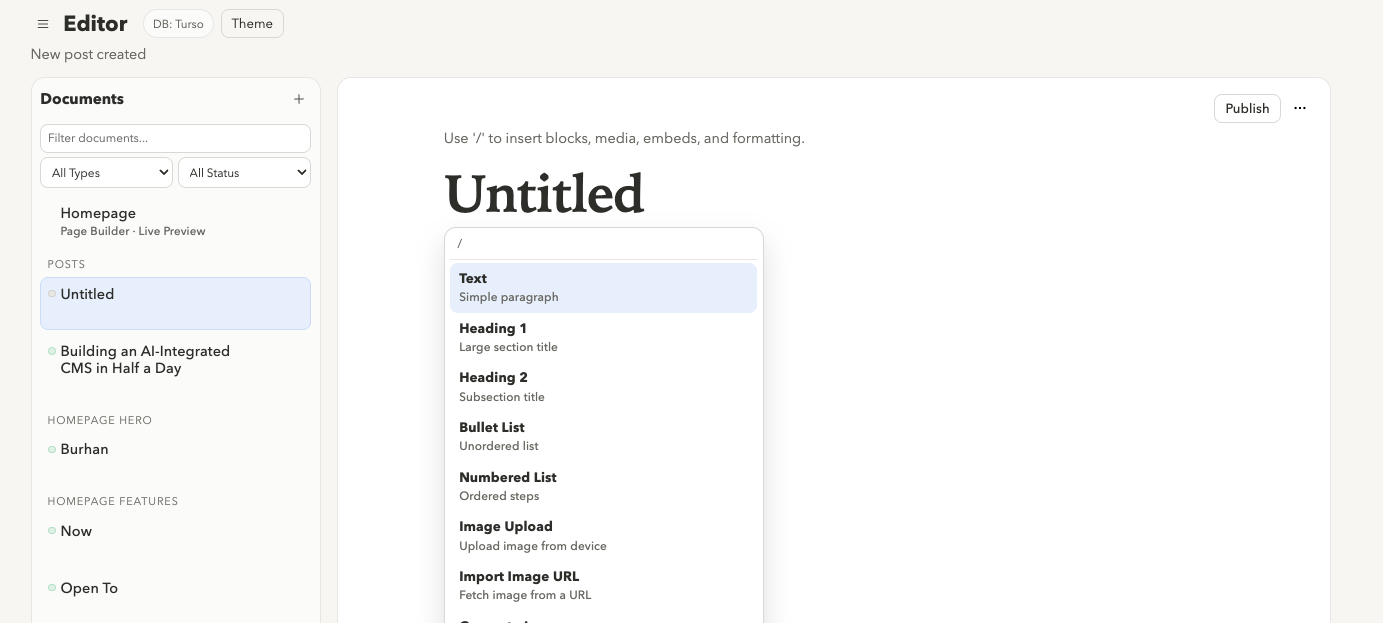
Phase 2: Editor UX, then ruthless simplification
The initial editor worked, but it was too “tool-heavy.” We iterated toward focus-first writing:
Removed most explicit toolbar buttons.
Leaned on slash commands and contextual controls.
Added autosave behavior.
Derived slug from title automatically.
Moved settings into a subtle top-right menu.
Made schedule controls conditional (only shown when scheduling is enabled).
We also made major layout changes:
Full-width writing mode.
Collapsible/collapsed-by-default media rail.
Cleaner document list and tighter typography.
Minimal button styling (no loud backgrounds).
The principle we followed throughout:
controls appear when needed, disappear when not.
There's still plenty of room for improvement in the UX.
Phase 3: TipTap block behaviors and drag/drop
Getting to a true block-editor feel required several iterations:
Drag handles for block movement.
Reordering blocks via handle.
Drag/drop from media library into editor.
Support for creating a new block on drop, not only dropping into existing text nodes.
We hit versioning and dependency friction around TipTap extensions (notably drag-handle-related packages), then normalized versions to compatible sets.
Phase 4: Media support and lightweight media library
We added:
Upload/import image flow.
Local media listing and deletion.
Insert from media panel.
Drag from media library into editor content.
Later, we refined placement and UX over pure functionality, moving media under Documents and reducing visual noise.
Phase 5: Homepage as composable content system
Instead of hardcoding homepage sections, we made homepage pieces editable content records. Then we built a homepage editor with:
Grouped modules by type.
Reordering via drag/drop.
Live preview.
Horizontal split preview layout with collapse support.
Hero image support and recent post hero images.
We then merged “homepage now” and “homepage features” into a single home_feature model to reduce conceptual overhead.
Phase 6: Add “stream of consciousness” (short-form thoughts)
We introduced a Twitter-like short-form stream on the homepage, but native to the CMS. This is where things got really interesting. I wanted a quick way to share my thoughts. I was thinking about what the best surface for that would be? WhatsApp? iMessage? And then I realized that I may be able to "talk" to ChatGPT like I normally do and ask it to post my thought for me. I built a custom GPT, integrated it with my Lambda function, and voila! it posts for me. Sadly, voice mode does NOT let me do this yet, but it gets everything I need ready and I just have to type publish.
Phase 7: Theme consistency and style safety
As content and components grew, style drift started showing up. We tightened this by:
Centralizing theme variables (fonts, sizes, spacing, radii).
Ensuring standalone editor and homepage editor render consistently.
Sanitizing rich text to prevent arbitrary markup from breaking theme contracts.
Moving commonly edited style values into theme controls.
We also polished homepage details:
Removed unnecessary hero links.
Serif italic subhead styling.
Friendlier hover-only metadata display.
Cleaner writing cards and spacing.
Reduced visual chrome across the board.
Phase 8: Local -> hybrid cloud with Turso
Once local-first was stable, we added cloud persistence via Turso while preserving local fallback behavior.
Data mode behavior
If
TURSO_DATABASE_URLis present: use Turso.Otherwise: use local SQLite.
This let us keep development friction low while enabling cloud persistence for deployment workflows.
Migration path
We added a migration script to sync local SQLite content to Turso:
Upsert mode for safe repeat runs.
Optional wipe-and-replace mode for exact replication.
This is the exact kind of “hybrid” that works in practice: local for speed, cloud for durability and remote integrations.
Phase 9: ChatGPT integration via a tiny cloud surface
We intentionally did not move the whole CMS to Lambda.
Instead, we carved out one focused endpoint layer for mobile/voice capture from ChatGPT.
Initially, we considered multiple operations (draft/publish), then simplified:
Keep one action:
POST /thoughtsAlways publish immediately
Optional tags
This keeps mental load near zero:
“Create a thought” means “it appears on the site.”
Biggest debugging lessons from the build
Version coherence matters more than feature docs
TipTap extension mismatches caused real friction.Build artifacts can fail weirdly
We hit transient Next.js module resolution errors (Cannot find module './331.js'in.nextoutput). Cleaning rebuild state and stabilizing dependency graph helped.Keep cloud scope tiny early on
A single intake Lambda was better than forcing the whole app serverless.Reduce UX entropy aggressively
Every extra button adds decision overhead. We repeatedly removed controls and improved context-aware actions.
Final architecture (where we landed)
CMS app: Next.js admin + public rendering
Editor: TipTap, Notion-like interaction model, slash/context actions
Primary authoring mode: local-first SQLite
Cloud persistence option: Turso
AI/mobile entrypoint: Lambda thought-intake endpoint for ChatGPT actions
Publishing model: static-capable output path for low-cost hosting
Why this worked in half a day
Because we kept saying no to complexity:
Local first, then cloud extension.
One focused cloud endpoint.
Minimalist UI with progressive disclosure.
Content model flexible enough for posts + homepage modules + thoughts.
Fast iteration loops instead of “perfect architecture” upfront.
The result is a system that feels personal, fast, and actually usable now, while still having a clean path to scale.
What's next?
There's still a lot more to do here. I want to start with integrating ChatGPT into the editor so that I can have a canvas-like experience where we can refine sentences and paragraphs at a time.
Visually, we are text heavy, and I like that. But at some point, we'll want to integrate video embeds, images in the Stream of Consciousness, etc.
Newsletter integration. It would be really cool to write a post and send it to a group of people. With the same simplicity as we've introduced in the editor.
I still have tons of things to tidy up with the design and my website altogether. More to come!